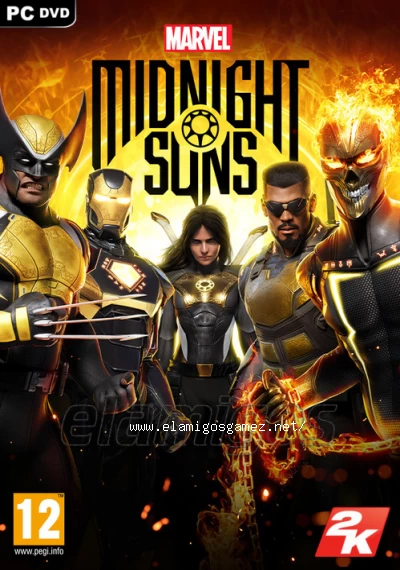
Marvels Midnight Suns Legendary Edition PC (2022) MULTi11-ElAmigos, 50.28GB
Description

Marvel’s Midnight Suns is the title that definitively blends the storyline, character relationships, customization, and progression of an RPG with the tactical strategy and combat mechanics of a card-based game. Set in the darker side of the Marvel Universe, you’ll forge unbreakable bonds of friendship with legendary Marvel Super-Heroes and dangerous supernatural warriors as you face the greatest global threat ever seen… the demonic forces of Lilith and the Old God Chthon.
Info Scene [Hypervisor bypass]
Upload size / to download: 51482MB
RAR parts: 5000MB (interchangeable/compatible)
ISO image size: 51482MB
Number of compressions: only one
Data recovery: none
Languages: English, French, Italian, German, Spanish, Polish, Portuguese-Brazil, Japanese, Korean, Chinese Simplified, Chinese Traditional
Dubbing/Audio: English, French, German, Spanish, Japanese, Korean, Chinese Simplified
Trailer
https://www.youtube.com/watch?v=o-IXFW6W3F8Requirements
Minimum requirements
Requires a 64-bit processor and operating system
OS: Windows 10 64-bit
Processor: AMD Ryzen 3-2200G / Intel Core i5-4430
Memory: 8 GB RAM
Graphics: AMD RX 470 / GeForce GTX 960 - 4GB
DirectX: Version 12
Storage: 60 GB available space
Requires a 64-bit processor and operating system
OS: Windows 10 64-bit
Processor: AMD Ryzen 3-2200G / Intel Core i5-4430
Memory: 8 GB RAM
Graphics: AMD RX 470 / GeForce GTX 960 - 4GB
DirectX: Version 12
Storage: 60 GB available space
Recommended requirements
Requires a 64-bit processor and operating system
OS: Windows 10 64-bit
Processor: AMD Ryzen 5-2600X / Intel Core i7-6700
Memory: 16 GB RAM
Graphics: AMD RX 5700 / GeForce GTX 1070
DirectX: Version 12
Storage: 60 GB available space
Requires a 64-bit processor and operating system
OS: Windows 10 64-bit
Processor: AMD Ryzen 5-2600X / Intel Core i7-6700
Memory: 16 GB RAM
Graphics: AMD RX 5700 / GeForce GTX 1070
DirectX: Version 12
Storage: 60 GB available space

Images


Observations
ElAmigos release. Updated till 08.06.2023; 8 DLC are included.Release is using Hypervisor bypass by DenuvOwO team. Instructions:
- install game
- educate yourself first by reading _Info.txt and DenuvOwO.nfo; CPU virtualization must be enabled in BIOS (some motherboards have it enabled as default setting)
- start as Administrator "VBS.cmd" from game folder, press 1, restart computer, then on the next boot press F7 when new window will show up (driver signature OFF)
- start from desktop icon
Once you make it work, any other game with Hypervisor can be installed and played from desktop icon (as long as you don't restart/shutdown PC - then again VBS.cmd > 1 > reboot > F7 > desktop icon)
Update installer gets stuck forever VIEW INFO
Download servers
In the ShortNest shortener, wait for the "GET LINK" button to access the links!/En el acortador ShortNest, espera el boton "GET LINK" para acceder a los enlaces!
How to download
Advertising

Comments
